How Much Are CNC Machines? Controller Interfaces and Training Costs
Discover how much CNC machines truly cost when factoring in controller types. Compare Fanuc, Haas, and Siemens training expenses and onboarding times.
The Base Price Illusion: Why Controller Choice Dictates True Cost
When shop owners and procurement managers ask, how much are cnc machines, they typically focus on the base hardware price. A standard 3-axis vertical machining center (VMC) might list for $65,000, while a complex 5-axis trunnion table mill pushes $180,000 to $250,000. However, evaluating machinery solely on the iron and spindle price ignores the most critical variable in total cost of ownership (TCO): the CNC controller interface and the associated operator training costs.
In the 2026 manufacturing landscape, the labor shortage makes operator onboarding a massive financial variable. A machine with a highly intuitive conversational interface might cost $15,000 more upfront but save $40,000 in training, reduced scrap, and faster time-to-competency over its first three years. Conversely, a legacy G-code-heavy interface requires extensive off-site schooling, longer supervised run times, and carries a higher risk of catastrophic crashes during the learning curve.
⚠️ Warning: The Hidden Scrap MultiplierA single crash caused by an operator misinterpreting a tool length compensation offset on an unfamiliar controller can cost $5,000 to $25,000 in spindle rebuilds, broken tooling, and ruined aerospace-grade titanium or Inconel workpieces. Always factor a minimum of 2% of the machine's base price as 'learning curve scrap' when switching controller brands.
Major Controller Interfaces: Cost and Training Matrix
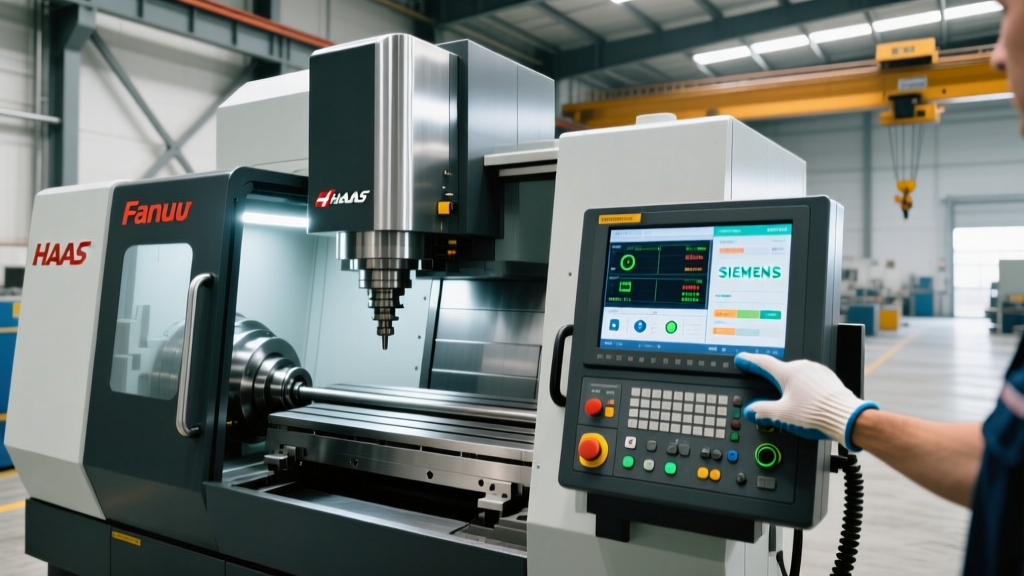
To accurately answer how much CNC machines cost to operate, we must break down the dominant controller ecosystems. The table below compares the financial and temporal investments required for the four primary interfaces found in modern machine shops.
| Controller Brand / Model | Typical Upcharge (vs Base) | Avg. Training Cost / Operator | Time to Basic Proficiency | Primary Programming Paradigm |
|---|---|---|---|---|
| Haas NGC (Next Gen Control) | Included (Standard) | $500 - $1,200 | 40 - 60 Hours | Conversational (VQC) / ISO |
| Fanuc 31i-B5 | +$8,000 - $15,000 | $1,500 - $3,000 | 80 - 120 Hours | Strict ISO G-Code / Macro B |
| Siemens Sinumerik ONE | +$12,000 - $22,000 | $1,800 - $2,500 | 60 - 90 Hours | ShopMill / ShopTurn (GUI) |
| Heidenhain TNC7 | +$15,000 - $28,000 | $2,000 - $3,500 | 70 - 100 Hours | Conversational / smartTouch |
Deep Dive: Controller Ecosystems and Onboarding Realities
Haas NGC (Next Generation Control)
The Haas NGC is ubiquitous in North American job shops, largely because its interface is designed to minimize the barrier to entry. Featuring a 15-inch multi-touch display and 1GB of program memory, the NGC leans heavily on Visual Quickcode (VQC). VQC allows operators to build complex pocketing, facing, and bolt-hole patterns without writing a single line of traditional G-code.
Training Best Practice: Transitioning a manual machinist to a Haas NGC takes roughly two weeks. Focus training on the 'Current Commands' pop-up window and the graphical tool path verification. The most common beginner error on the NGC is relying entirely on the conversational interface for 3D contouring, which is inefficient. Operators must be cross-trained in standard G-code for complex CAM-generated toolpaths.
Fanuc 31i-B5 Series
Fanuc remains the global standard for high-volume production and complex 5-axis simultaneous machining. The 31i-B5 offers nano-interpolation and advanced look-ahead capabilities that yield superior surface finishes on complex aerospace contours. However, the interface is notoriously utilitarian. It relies heavily on manual G-code entry, custom macro B programming, and a steep memorization curve for M-codes and G-codes.
Training Best Practice: Do not attempt to teach Fanuc operators purely on the shop floor. Utilize off-machine simulation software like CNC Simulator Pro or Fanuc's proprietary NCGuide. Operators should spend a minimum of 40 hours in a virtual environment mastering work coordinate systems (G54-G59) and tool length compensation (G43/G44) before touching the physical machine pendant. For authoritative technical documentation, refer to the Haas Next Generation Control resources for comparative baseline interfaces, or consult direct Fanuc manual repositories.
Siemens Sinumerik ONE
The Sinumerik ONE represents the cutting edge of digital twin integration. Unlike legacy controllers, the ONE is built on a native software architecture that allows shops to run a virtual replica of the machine on a PC using 'Create MyVirtualMachine'. The physical pendant features the 'ShopMill' and 'ShopTurn' graphical interfaces, which use fill-in-the-blank masks for toolpaths, drastically reducing programming time for lot-size-one production.
Training Best Practice: Leverage the digital twin for crash prevention. According to Siemens CNC Systems documentation, training operators to verify CAM toolpaths in the virtual environment before transferring them to the physical controller reduces setup scrap by up to 85%. Train operators to use the 'Program Manager' network integration to pull verified code directly from the shop's DNC server, eliminating USB drive malware risks and version-control errors.
Heidenhain TNC7
Heidenhain is the preferred interface for complex mold, die, and 5-axis aerospace machining in Europe and high-end global shops. The TNC7 introduces the 'smartTouch' interface, featuring a 19-inch touchscreen and a highly visual, state-based monitoring system. Heidenhain's conversational programming is incredibly robust, allowing operators to define complex 5-axis tilt angles and collision-check toolpaths directly at the pendant.
Training Best Practice: The TNC7's 'StateMonitor' provides real-time machine data. Train lead operators to use the graphical collision monitoring (DCM - Dynamic Collision Monitoring) feature. As detailed in the Heidenhain TNC7 specifications, DCM requires precise input of machine kinematics and tool holder geometries. If operators fail to map the exact tool holder profile in the tool table, the DCM will trigger false-positive stops, ruining cycle times and frustrating the workforce.
💡 Pro Tip: Standardizing Across Mixed FleetsIf your shop runs a mixed fleet (e.g., Haas mills and DMG Mori lathes with Siemens controls), do not force operators to memorize multiple G-code dialects. Invest in a unified CAM system (like Mastercam or Fusion 360) and standardize on a single post-processor workflow. Train operators to act as 'verifiers and setters' rather than manual programmers, reducing the cognitive load of switching between Fanuc and Siemens syntax.
The 30-60-90 Day Operator Onboarding Framework
To minimize the hidden costs associated with controller complexity, implement this structured onboarding protocol for new hires or when introducing a new machine brand to the floor.
- Days 1-30 (Syntax and Safety): Focus entirely on the controller's emergency stop logic, axis limit switches, and work offset measurement. The operator must prove they can safely indicate a vise, set a G54 work offset, and establish a Z-axis tool length offset without running a program. Milestone: Zero crashes during setup.
- Days 31-60 (Verification and Overrides): Introduce program verification. Teach the operator how to use the single-block execution, dry-run, and rapid-override switches. They must learn to read the 'distance-to-go' display to predict tool entry points. Milestone: Successful first-article inspection on a proven CAM program.
- Days 61-90 (Optimization and Troubleshooting): Train the operator on feed/speed overrides based on chip formation and spindle load meters. Introduce basic alarm code troubleshooting (e.g., resolving a 'Following Error' or 'Spindle Orientation Fault' without calling maintenance). Milestone: Independent operation and minor program optimization.
Frequently Asked Questions
So, exactly how much are CNC machines when training is included?
A baseline 3-axis VMC costs between $50,000 and $80,000. When you add a premium controller (like Siemens or Heidenhain), off-site training ($2,500 per operator), and the first 90 days of supervised labor and learning-curve scrap, the true first-year cost of ownership easily reaches $110,000 to $130,000 per machine.
Which controller is the cheapest to train operators on?
The Haas NGC is widely considered the most cost-effective interface to train on. Its conversational VQC interface, intuitive graphical toolpath verification, and widespread availability of free online tutorial videos allow shops to train operators internally, saving $2,000+ per employee in external schooling fees.
Can we retrofit an older machine with a modern controller to save money?
Retrofitting a legacy machine with a modern CNC retro-kit (like a Centroid or Mach4-based system) costs between $8,000 and $15,000. While this updates the interface, it does not update the machine's mechanical rigidity, ball screw backlash, or servo response times. For high-precision work, the training saved on a new interface is quickly lost to mechanical troubleshooting on old iron.