Best Budget CNC Machines for Desktop Prototyping (2026)
Discover the best budget CNC machines for desktop prototyping in 2026. Compare specs, pricing, and capabilities for small-scale manufacturing and R&D.
The Reality of 'Budget' in Desktop CNC Prototyping
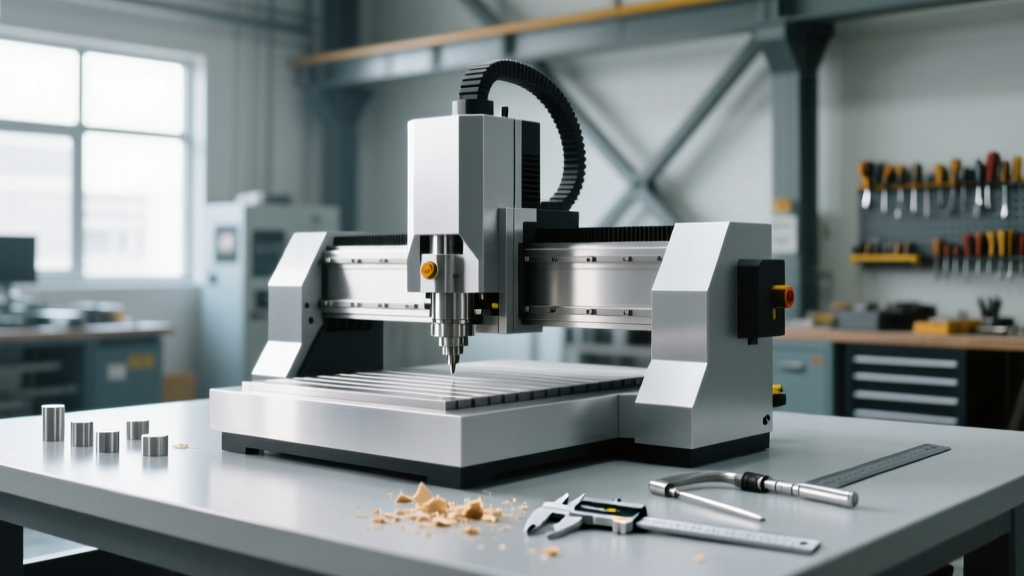
In the landscape of desktop manufacturing, the term 'budget' is highly relative. For a professional R&D lab or an independent hardware startup in 2026, a budget CNC machine typically falls between $600 and $2,500. At this price point, you are fundamentally trading mass and rigidity for footprint and accessibility. Unlike $20,000 industrial VMCs (Vertical Machining Centers) that weigh 3,000 pounds and use liquid-cooled spindles, desktop mills rely on NEMA 23 stepper motors, extruded aluminum or steel linear rails, and air-cooled trim routers.
However, the gap between hobbyist toys and professional prototyping tools has narrowed significantly. Modern budget CNC machines can reliably hold tolerances of ±0.005 inches in plastics and wood, and ±0.010 inches in soft metals like 6061 aluminum, provided the operator understands the machine's physical limitations. According to NIST's Advanced Manufacturing guidelines, rapid desktop prototyping reduces initial iteration cycles by up to 40% compared to outsourcing to machine shops, making the ROI on a sub-$2,500 mill immediate for hardware teams.
2026 Desktop CNC Matrix: Specs, Pricing, and Use Cases
The following matrix breaks down the top contenders in the budget space, categorized by their structural capabilities and ideal prototyping materials.
| Model | Approx. Price | Work Area (X/Y/Z) | Spindle / Motor | Collet System | Best Application |
|---|---|---|---|---|---|
| FoxAlien Masuter Pro | $599 | 400 x 380 x 90 mm | 300W DC Spindle | ER11 (7mm max) | PCBs, Delrin, Wax, Wood |
| Genmitsu PROVerXL 4030 V2 | $1,099 | 400 x 300 x 110 mm | 300W (Upgradable to 1kW) | ER11 (7mm max) | Signage, Plastics, Light Aluminum |
| Carbide 3D Shapeoko 5 | $2,199 | 16 x 16 x 3 in (Std) | 1.25 HP Makita Router | 1/4" (6.35mm) | Production Plastics, 6061 Aluminum |
| Inventables X-Carve (1m) | $1,499 | 750 x 750 x 65 mm | 1.25 HP Makita Router | 1/4" (6.35mm) | Large Wood/Acrylic Panels |
The Collet and Spindle Bottleneck
When evaluating budget CNC machines, buyers often fixate on work area size while ignoring the spindle and collet interface. This is a critical mistake that directly impacts your ability to prototype in metal.
ER11 vs. 1/4-Inch Router Collets
Most machines under $1,000 utilize an ER11 collet system. The maximum shank diameter an ER11 can hold is 7mm (just over 1/4 inch). This limits you to 1/4-inch shank endmills. While 1/4-inch carbide endmills are fine for wood and plastics, they lack the cross-sectional mass required to absorb the harmonic vibrations generated when cutting aluminum. The result is tool deflection, poor dimensional accuracy, and frequent endmill breakage.
Machines in the $1,500 to $2,500 range often use standard Makita compact routers (like the RT0701C) which accept 1/4-inch shanks natively, or they offer ER20 upgrades. An ER20 collet allows for 1/2-inch shank endmills. The jump from a 1/4-inch to a 1/2-inch shank increases the tool's moment of inertia exponentially, drastically reducing chatter and allowing for deeper depths of cut (DOC) in metals.
Material-Specific Selection Framework
Match your machine purchase to the specific materials your R&D pipeline demands. Do not buy a heavy-duty machine if you only mill FR4 fiberglass for PCBs, and do not buy a lightweight machine if you need aluminum brackets.
- PCBs, Wax, and Machinable Plastics (Delrin/Acetal): The FoxAlien Masuter Pro or Genmitsu 3018-PROVer are sufficient. These materials require high spindle RPMs (15,000 - 25,000) and low cutting forces. Z-axis rigidity is less critical here.
- Acrylic, Polycarbonate, and HDPE: Require a machine with a rigid spoilboard and excellent hold-down capabilities. Acrylic melts and re-welds if the feed rate is too slow. The Shapeoko 5 or X-Carve provides the necessary rapid traverse rates (up to 100 IPM) to clear chips before they melt.
- 6061 Aluminum and Brass: Demands high machine mass, rigid linear rails (avoid V-wheels if possible, opt for linear guide blocks), and a high-torque spindle. The Carbide 3D Shapeoko HDM (Heavy Duty Metal) variant, while pushing the upper limit of the 'budget' category at around $3,499, uses 15mm linear guides and a liquid-cooled spindle specifically for this use case.
Hidden Costs and 'Gotchas' in Budget CNC Ownership
The sticker price of a budget CNC machine is rarely the final price. Factor in these mandatory operational costs when budgeting for your prototyping lab:
Workholding is Not Optional: Budget machines ship with basic T-track tables and cheap toe-clamps. To mill aluminum accurately, you must invest in a precision CNC vise (like a Kurt DX6 or a budget equivalent from Glacern, ~$300) and a set of parallel blocks. Attempting to mill metal using double-sided tape or basic toe-clamps will result in the workpiece lifting, ruining the part and potentially snapping the endmill.Software and CAM Licensing: While CAD tools like Fusion 360 offer free tiers for hobbyists and early-stage startups, commercial use requires a subscription (~$545/year). Alternatively, Carbide 3D includes Carbide Create (CAD/CAM) for free with their machines, which is highly capable for 2.5D prototyping but lacks advanced 3D toolpaths. For complex 3D surfacing, you may need to budget for Vectric VCarve Pro (~$350).
Dust Collection and Noise: Desktop CNCs are incredibly loud (often exceeding 85 dB when routing MDF or aluminum). You must budget for a dedicated shop vac or dust extractor (e.g., Dust Deputy) and acoustic enclosures if the machine is located in a shared office environment.
Step-by-Step: First Aluminum Prototype Workflow
Milling 6061 aluminum on a budget desktop CNC requires conservative parameters. Follow this exact workflow for a successful first run on a machine like the Shapeoko 5 Standard.
- Tooling Selection: Use a 1/4-inch, 3-flute carbide endmill specifically coated for aluminum (ZrN or uncoated polished carbide). Avoid TiN or TiAlN coatings, as aluminum tends to gall and stick to these coatings.
- Workholding: Secure the aluminum blank in a precision vise. Ensure the part is seated flat on the parallels. Use a dead-blow mallet to tap the part down until the parallels are snug and cannot be moved by hand.
- Feeds and Speeds Calculation: For a 1/4-inch 3-flute endmill in 6061 aluminum on a desktop router, set the spindle speed to 12,000 RPM. Set the feed rate to 40 IPM (Inches Per Minute).
- Depth of Cut (DOC) and Stepover: Limit your DOC to 0.020 inches (half a millimeter) per pass. Set the stepover (radial engagement) to 40% of the tool diameter (0.100 inches). This reduces lateral cutting forces, protecting the machine's stepper motors from losing steps.
- Coolant Strategy: Desktop CNCs rarely have flood coolant. Use a misting system (like a Fogbuster) or manually apply a light mist of WD-40 or specialized aluminum cutting fluid every few minutes to prevent chip welding. Alternatively, use an air-blast nozzle to aggressively clear chips from the flute.
Verifying Tolerances Post-Machining
After completing the prototype, do not assume the part meets the standard CNC machining tolerances advertised by industrial shops (typically ±0.005"). Budget desktop machines are subject to thermal expansion and belt stretch. Always measure critical dimensions with digital calipers or a micrometer. If you find consistent dimensional errors (e.g., a 1.000-inch pocket consistently mills to 1.003 inches), you can compensate for this by applying a negative tool diameter offset in your CAM software, effectively tricking the machine into cutting slightly tighter paths to achieve the exact target dimension.
For deeper insights into maintaining and upgrading these machines, the community documentation at Make: Magazine's CNC workshop remains an invaluable resource for hardware hackers and R&D engineers pushing budget equipment beyond its factory specifications.